


1000
The 1000 Series from RIGOL include the B, D, and E series oscilloscopes. The E Series are the value leader with 50-100 MHz models that include 2 channels and 1 Million points of memory. The D Series add low speed digital capture enabling basic mixed signal analysis in a economic package. The B Series provide more speed and power including our economic 4 channel, 200 MHz DS1204B model which provides 2 GSa/sec sampling. With features including FFTs, record and replay, roll mode, alternate trigger mode, and adjustable trigger sensitivity the 1000 Series is a great entry for value oscilloscope requirements.
Explore the 1000 Series Digital Oscilloscopes
1 to 2 GSa/s Max Sample Rate
Never miss a transition or glitch with 1 to 2 GSa/sec sampling. Sample Rate describes the frequency at which the instrument samples the data. Higher the sample rate provides better resolution and finer detail of the signal being captured.
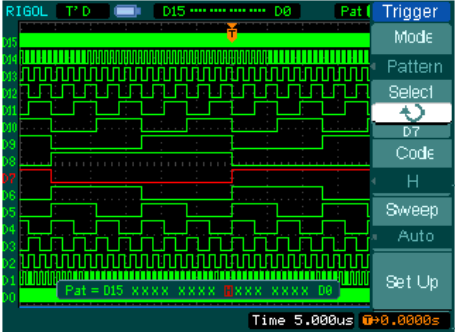
5.7” QVGA Display
The display capability provides resolution and clarity to capture signals with an entry level digital oscilloscope.
Up to 1 Million points of memory
The 1000D and 1000E oscilloscopes provide 1 Million points of memory in a single waveform while the 1000B series provides up to 16,000 points. Memory depth enables more complete analysis of complex and longer waveforms.
Trigger modes including edge, pulse width, slope, video, pattern, continuous time, and alternate
With advanced trigger capabilities for an entry level oscilloscope analyze pulses, video, digital, and non-correlated signals with dedicated trigger modes.
1000
Model |
Bandwidth |
Analog Channels |
Digital Channels |
Price |
|
|---|---|---|---|---|---|
| DS1052E | 50 MHz | 2 | N/A | UNAVAILABLE |
|
| DS1102E | 100 MHz | 2 | N/A | UNAVAILABLE |
|
| DS1052D | 50 MHz | 2 | 16 | UNAVAILABLE |
|
| DS1074B | 70 MHz | 4 | N/A | UNAVAILABLE |
|
| DS1102D | 100 MHz | 2 | 16 | UNAVAILABLE |
|
| DS1104B | 100 MHz | 4 | N/A | UNAVAILABLE |
|
| DS1204B | 200 MHz | 4 | N/A | UNAVAILABLE |
|
| DS1202CA | 200 MHz | 2 | N/A | UNAVAILABLE |
|
| DS1302CA | 30 MHz | 2 | N/A | UNAVAILABLE |
|
Included Accessories
 DS1000D/E User's Guide | |
| DS1000D_E Specs | |
| DS1000E Quick Guide | |
| DS1000E/D Performance Verification Guide | Here is the procedure for verifying the performance of a DS1000E/D series oscilloscope. |
| DS1000E/D Service Guide | |
| Oscilloscope Declassification Guide | This document outlines the types of memory, locations, and sanitization process for the current Oscilloscopes. |
| DS1000B User's Guide | |
| DS1000B Quick Guide | |
| DS1000CA User's Guide | |
| DS1000CA Quickguide |
 Utilizing deep memory with Rigol DS1000 Oscilloscope | Some Digital scopes offer the capability of capturing waveforms in Long Memory mode. Utilizing the long memory, Rigol scopes can capture complex signals in great detail over extended time periods. This allows an observer to examine high frequency effects within the captured waveform.
To enable long memory on your DS1000E series scope, follow these simple steps:
1- Press the “Acquire” button, an acquisition menu will appear on the right hand side of the screen.
3- Find the blue soft button corresponding with Long Memory
4- Switch the Memory Depth to Long Memory
For more detailed information about Long Memory, please view and download the Long Memory application note available on RigolNA.com through the solutions search feature at the following link: http://www.rigolna.com/applications/ |
| What are the number of points captured by a DS1000E/D and replayed on a DG1022? | The attached FAQ describes how waveform files (WFM file extensions) are mapped to the DG1022 arbitrary waveform mode. |
| UltraScope for DS1000D | Waveform capture software for DS1000D Series Oscilloscopes. |
| UltraScope for DS1000E | Oscilloscope Waveform Capture Software for DS1000E Series. |
| UltraSigma Instrument Connectivity Driver | Software for Communicating with instruments over VISA. UltraSigma is also a container and gateway for software such as Ultra Signal Studio, Ultra Spectrum, Ultra Power, and more. |
| Can I use RS-232 with Ultrascope? | Yes.
This can be especially helpful if you are experiencing issues with your USB driver or other communication issues.
Check out this procedure for step-by-step directions. |
| Can I view and print the graphs in Black and White in Ultrascope? | Yes. To save on printing inks, you can invert the graph colors in Ultrascope by following the attached procedure. |
| How can I zoom in Ultrascope? | You can zoom in on features for the Waveforms as well as the Virtual Front panel.
Follow the attached procedure. |
| LabVIEW 2010 Example for a DS1000E/D: Data collection and transfer | This example and it's corresponding EXE use VISA to communication with a Rigol DS1000E/D scope.
The example allows the user to configure the oscilloscope for different data collection sizes (Normal or Long). It then graphs the data. |
| Simple Excel 2010 VBA Control program DS1000E DS1000D Oscilloscopes | We have built a small VBA based demo program for use with Microsoft Excel.
See attachments for details. |
| UltraScope User's Video | Here is a short video on using Rigol UltrScope Software. This is free software for control and data retrieval for Rigol DS1000E, D, CA, and B series of Oscilloscopes. |
| UltraScope Windows 7 installation instructions | By Default, Ultrascope will only be installed on the administrative user accounts.
To use Ultrascope on Guest and other user accounts without administrative privileges, please follow the attached directions.
Note: These instructions were developed on Win 7 and may not work for all OS'. |
| What are the maximum number of points I can return with Ultrascope? | Ultrascope can only bring back 600 data points at this time. This is equivalent to the displayed data size and also the number of horizontal pixels available on the LCD. |
| UltraScope for DS1000B | Waveform capture software for DS1000B Series Oscilloscopes. |
| DS1000B LabVIEW 2011 Simple Data Transfer | This VI allows you to select the channel for data transfer and save off data as a CSV file format. Written in LabVIEW 2011. |
| Ultrascope for DS1000CA | Waveform capture software for DS1000CA Series Oscilloscopes. |
| Simple Excel VBA Control program DS1000CA DS1000B Oscilloscopes | We have built a small VBA based demo program for use with Microsoft Excel.
See attachments for details. |
| C#.NET basic instrument communication example | Here is a short example on using National Instrument VISA and C#.NET to communicate with an instrument. |
| How do I install UltraSigma Compatible software? | You will need to have Ultra Sigma installed first.
Contact Rigol for more information.
Ultra IQ provides modulation waveform editing for the DSG3000 series of RF sources.
Ultra Power provides instrument control and data collection for the Rigol DP series of power supplies.
Ultra Signal Studio is a legacy software package that provides arbitrary waveform creation, editing, and download capabilities for the Rigol DG4000 and DG5000 arbitrary waveform generators.
Ultra Station is a software package that provides arbitrary waveform creation, editing, and download capabilities for the Rigol DG1000Z, DG4000 and DG5000 arbitrary waveform generators.
Ultra Spectrum provides instrument control and spectrum analysis for Rigol DSA1000, 1000A, and 800 series Digital Spectrum Analyzers. |
| How do I install UltraSigma? | UltraSigma is a software installation that provides basic communications between a computer and an instrument using VISA.
It is also used to contain instrument specific software like UltraSpectrum for use with Rigol Spectrum Analyzers, Ultra Signal Studio for Arbitrary Waveform Generators, and Ultra Power for Power Supplies. |
| Rigol Software Installation and Usage guide | An overview of the installation and usage of the Ultra Family of software products from RIGOL |
| User's Guide for UltraSigma Software | UltraSigma is a VISA based communication and shell program that eases communication and remote control of instrumentation.
We have built a short user's guide to familiarize user's with the features of UltraSigma. |
Included Accessories
50 Ohm Adaptor
Model |
Description |
Price |
Downloads |
Action |
|---|---|---|---|---|

ADP0150BNC
|
50 Ohm impedance adapter for oscilloscopes or generators In Stock |
$19.00
|
|
|
BNC Cable
Model |
Description |
Price |
Downloads |
Action |
|---|---|---|---|---|

CB-BNC-BNC-MM-100
|
BNC Cable (length 1 meter) Ships in 8 weeks |
$20.00
|
|
|
Carrying Case
Model |
Description |
Price |
Downloads |
Action |
|---|---|---|---|---|
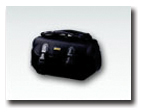
BAG-DS1000
|
Instrument Carry Case for a DS1000 Series Oscilloscope In Stock |
$69.00
|
|
|
Current Probe
Model |
Description |
Price |
Downloads |
Action |
|---|---|---|---|---|

RP1002C
|
Current Probe, DC-1 MHz,70A peak In Stock |
$1,791.00
|
|
|

RP1001C
|
Current Probe, DC-300 kHz,100 Apeak In Stock |
$867.00
|
|
|

RP1003C
|
Current Probe, DC-50 MHz,50A peak. Requires RP1000P power supply. In Stock |
$3,408.00
|
|
|

RP1004C
|
Current Probe, DC-100 MHz,50 A peak. Requires RP1000P power supply. In Stock |
$4,909.00
|
|
|

RP1005C
|
Current Probe, DC-10 MHz,300A peak. Requires RP1000P power supply. In Stock |
$4,332.00
|
|
|

RP1006C
|
Current Probe, DC-2 MHz,500A peak. Requires RP1000P power supply. ≤25mArms noise Ships in 8 weeks |
$5,490.00
|
|
Current Probe Power
Model |
Description |
Price |
Downloads |
Action |
|---|---|---|---|---|

RP1000P
|
RP1003C/RP1004C/RP1005C probe power supply Ships in 8 weeks |
$1,560.00
|
|
|
Differential Probe
Model |
Description |
Price |
Downloads |
Action |
|---|---|---|---|---|

RP1025D
|
High Voltage Differential Probe, DC-25 MHz, 1400 Vpp In Stock |
$473.00
|
|
|

RP1050D
|
High Voltage Differential Probe, DC-50 MHz, 7000 Vpp In Stock |
$683.00
|
|
|

PHA0150
|
70 MHz 1500 V Differential Voltage Probe In Stock |
$799.00
|
|
|

PHA1150
|
100 MHz 1500 V Differential Voltage Probe In Stock |
$999.00
|
|
|
|
PHA2150
|
200 MHz 1500 V Differential Voltage Probe
In Stock |
$1,590.00
|
|
|
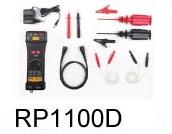
RP1100D
|
High Voltage Differential Probe, DC-100 MHz, 7000 Vpp Ships in 8 weeks |
$788.00
|
|
GPIB Adaptor
Model |
Description |
Price |
Downloads |
Action |
|---|---|---|---|---|
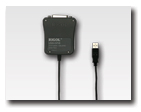
USB-GPIB
|
USB-GPIB Converter. Connect USB directly to instrument and control it via GPIB. This does not connect to a PC directly. In Stock |
$346.00
|
|
High Voltage Probe
Model |
Description |
Price |
Downloads |
Action |
|---|---|---|---|---|

RP1010H
|
High Voltage Probe with 40MHz bandwidth, 10kV max DC voltage, 1000:1 attenuation In Stock |
$524.00
|
|
|
|
RP1018H
|
High Voltage Probe with 150MHz bandwidth, 18kV max DC voltage, 1000:1 attenuation In Stock |
$1,038.00
|
|
|

RP1300H
|
100:1 300 MHz TO 2KV PASSIVE PROBE In Stock |
$243.00
|
|
Optical-fiber Isolated Probe

Passive Probe
Model |
Description |
Price |
Downloads |
Action |
|---|---|---|---|---|

PVP2150
|
150 MHz Passive Probe with 1x:10x selector. Wide bandwidth of 35 MHz in 1x mode. In Stock |
$40.00
|
|
Rack Mount Kit
Model |
Description |
Price |
Downloads |
Action |
|---|---|---|---|---|

RM-DS-1B
|
Rack Mounting Kit for a DS1000B scopes. May be different than image. Rack kits may look different than picture. In Stock |
$340.00
|
|
|
|
RM-DS-1B
|
Rack Mounting Kit for a DS1000B scopes. May be different than image. Rack kits may look different than picture In Stock |
$340.00
|
|